

Azure HPC Recipe Document for Ansys CFX
1 Introduction
Running a complex CFD simulation requires significant amount of time and the latest hardware with faster compute (CPU and GPU) capabilities. Microsoft Azure provides all the necessary infrastructure required to run these high-end work loads and jobs. The Microsoft Azure Virtual Machines are equipped with latest CPUs and GPUs in the market. One such Azure Virtual Machine Configuration is HB120rs_v3 Virtual Machine.
The HBv3 virtual machine is a new flagship addition to the Azure CPU family. (Standard_HB120rs_v3 Virtual Machine). HBv3 VMs feature up to 120 AMD EPYC 7003-series (Milan) CPU cores, 448 GB of RAM.
|
Size |
vCPU |
Memory: GiB |
Memory bandwidth GB/s |
Base CPU frequency (GHz) |
All-cores frequency (GHz, peak) |
Single-core frequency (GHz, peak) |
RDMA performance (Gb/s) |
Max data disks |
|
Standard_HB120rs_v3 |
120 |
448 |
350 |
2.45 |
3.1 |
3.675 |
200 |
32 |
|
Standard_HB120-96rs_v3 |
96 |
448 |
350 |
2.45 |
3.1 |
3.675 |
200 |
32 |
|
Standard_HB120-64rs_v3 |
64 |
448 |
350 |
2.45 |
3.1 |
3.675 |
200 |
32 |
|
Standard_HB120-32rs_v3 |
32 |
448 |
350 |
2.45 |
3.1 |
3.675 |
200 |
32 |
|
Standard_HB120-16rs_v3 |
16 |
448 |
350 |
2.45 |
3.1 |
3.675 |
200 |
32 |
Ansys CFX 2021 R2 is tested on HB120rs_v3 VM and the performance results are analyzed. The subsequent section will show the performance of Ansys CFX on Azure HBv3 Virtual Machine
2 Ansys CFX Performance on Azure Virtual Machine
2.1 Ansys CFX Overview
Ansys CFX is the industry leading CFD software for turbomachinery applications. Shorten development time with streamlined workflows, advanced physics modelling capabilities and accurate results
Known for its extreme robustness, CFX is the gold standard CFD software when it comes to turbomachinery applications. Both solver and models are wrapped in a modern, intuitive, and flexible GUI, with extensive capabilities for customization and automation using session files, scripting, and a powerful expression language. Highly scalable high-performance computing will help speed up simulations including pumps, fans, compressors, and turbines.
|
Product Highlights |
Turbomachinery Capabilities |
|
|
2.2 Model Details
Many factors can influence HPC scalability, including the mesh size, elements type, mesh topology, physical models, etc. All of these vary widely from case to case. Therefore, for HPC benchmark results that are most meaningful and applicable to an individual use of the software, it is best to use the standard HPC benchmark cases which are available from the ANSYS Customer Portal. User can request for Ansys CFX models by contacting Ansys.
The benchmark models used are shown below,
2.2.1 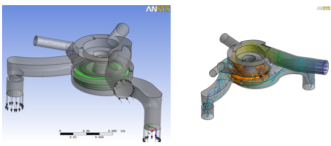 Pump
Pump
Case Details:
a) Automotive pump with rotating and stationary components
- Turbulent k-e, incompressible, isothermal, multiple frames of reference.
- Advection- scheme: specified blend factor 0.75
b) Global mesh size: 1,305,718 Nodes, 5362055 Elements
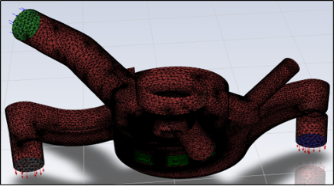 Tetrahedra-4, 509, 881, Prisms-850, 617, Pyramids-1557
Benchmark information:
c) Suitable for up to ~16 cores
d) Currently set to 10 iterations
e) Partitioning memory requirement ~450 MB
f) Partitioning time <20 sec on Intel i72820qm (Sandy Bridge)
g) Solver memory requirement (total) ~3 GB
2.2.2 10M Airfoil
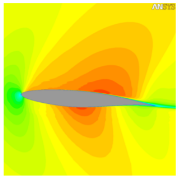 Case Details:
a) Transonic flow around an Airfoil. Flow is 2D the mesh is extruded to give a 3D meshes of various sizes
- Turbulent SST, ideal gas, heat transfer
- Default advection scheme (high resolution)
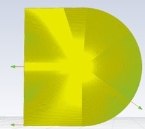
b) Global mesh size: 9,933,000 nodes, 9,434,520 elements (all hexahedra)

 Benchmark information:
a) Suitable for up to ~50 partitions
 b) Currently set to 5 iterations
c) Partitioning memory requirement 1.7 GB
d) Partitioning time <1 min on Intel 5670
e) Solver memory requirement (total) 13 GB
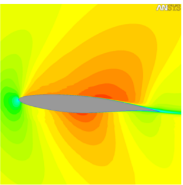
2.2.3 50M Airfoil
Case Details:
a) Transonic flow around an Airfoil. Flow is 2D the mesh is extruded to give a 3D meshes of various sizes
- Turbulent SST, ideal gas, heat transfer
- Default advection scheme (high resolution)
b) Global mesh size: 47,773,000 nodes, 47,172,600 elements (all hexahedra)
Benchmark information:
a) Suitable for up >100 partitions
b) Currently set to 5 iterations
c) Need to use Large Problem Partitioner: Select in solver manager, or from command line use “part large” argument
d) Partitioning memory requirement ~13 GB
e) Partitioning time ~5 min on Intel 5670
f) Solver memory requirement (total) ~65 GB
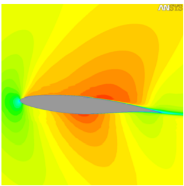
2.2.4 100M Airfoil
Case Details:
a) Transonic flow around an Airfoil. Flow is 2D the mesh is extruded to give a 3D meshes of various sizes
- Turbulent SST, ideal gas, heat transfer
- Default advection scheme (high resolution)
b) Global mesh size: 104,533,000 nodes, 103,779,720 elements (all hexahedra)
Benchmark information:
a) Suitable for 100s 1000s of partitions
b) Currently set to 5 iterations
c) Need to use Large Problem Partitioner: Select in solver manager, or from command line use “part large” argument
d) Partitioning memory requirement ~28 GB
e) Partitioning time ~15 min on Intel 5670
f) Solver memory requirement (total) ~140 GB
2.3 Ansys CFX 2021 R2 Performance on Azure Platform
When it comes to performance parameters, wall clock time (time taken to complete the simulation) is one parameter, which needs to be analysed. To carry out these fluid flow related simulations on Ansys CFX software, right hardware is required. Microsoft partnered with AMD provides the required and suitable Infrastructure and hardware on Azure cloud platform. Microsoft Azure provides the latest and fastest compute capabilities for CPU intensive workloads.
|
System/Software Details |
|
|
Operating system version |
CentOS Linux release 8.1.1911 (Core) |
|
OS Architecture |
Linux X86-64 |
|
MPI |
Intel MPI |
2.4 Ansys CFX 2021 R2 Performance Results on Single Node
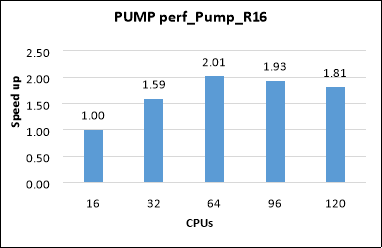
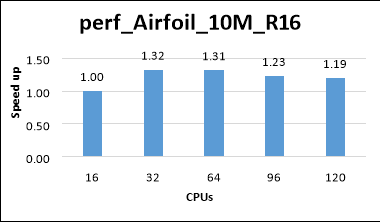
CFD analysis is carried out to see the performance of Azure HBv3 Series Virtual Machines and based on the single node results, the optimal VM configuration for Ansys CFX Solver is determined. Refer chapter 1 for the VM specifications (HBv3 Series with 16,32,64,96 and 120 CPUs). Performance tests were performed on the mentioned specifications correspondingly with the provided models, and the elapsed run time and speed up have been determined and presented below.
The results are presented below for standard HPC benchmark cases as mentioned below
- Pump: Assembly of stator and rotor
|
Job Name |
Iterations |
Cores |
CFD solver walk clock Time (s) |
Speed Up |
|
PUMP perf_Pump_R16 |
10 |
16 |
32.59 |
1.00 |
|
32 |
20.48 |
1.59 |
||
|
64 |
16.19 |
2.01 |
||
|
96 |
16.85 |
1.93 |
||
|
120 |
18.00 |
1.81 |
- Airfoil with 10M mesh size
|
Job Name |
Iterations |
Cores |
CFD solver walk clock Time (s) |
Speedup |
|
perf_Airfoil_10M_R16 |
5 |
16 |
149.40 |
1.00 |
|
32 |
113.05 |
1.32 |
||
|
64 |
113.87 |
1.31 |
||
|
96 |
121.71 |
1.23 |
||
|
120 |
125.10 |
1.19 |
- Airfoil with 50M mesh size
|
Job Name |
Iterations |
Cores |
CFD solver walk clock Time (s) |
Speed Up |
|
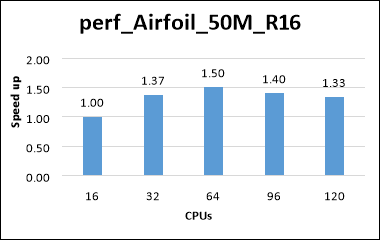
perf_Airfoil_50M_R16 |
5 |
16 |
861.34 |
1.00 |
|
32 |
627.99 |
1.37 |
||
|
64 |
573.76 |
1.50 |
||
|
96 |
616.32 |
1.40 |
||
|
120 |
646.07 |
1.33 |
- Airfoil with 100M mesh size
|
Job Name |
Iterations |
Cores |
CFD solver walk clock Time (s) |
Speed Up |
|
perf_Airfoil_100M_R16 |
5 |
16 |
2029.20 |
1.00 |
|
32 |
1541.70 |
1.32 |
||
|
64 |
1445.70 |
1.40 |
||
|
96 |
1451.70 |
1.40 |
||
|
120 |
1473.70 |
1.05 |
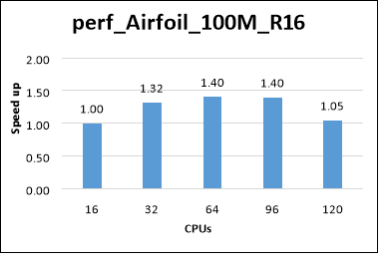
We can see that the Performance scalability is improving as we increase the number of cores on the Virtual Machine. Since the simulations are performed on single node and the memory bandwidth is fixed, the solver performance will saturate after a certain number of cores are reached. To overcome this limitation and to fully utilize the CFX Solver Capabilities, a multi-node setup is deployed, and the Performance Benchmarking is carried out using Azure HBv3 Virtual Machines.
2.5 Ansys CFX 2021 R2 Performance Results on Multi Node
Standard_HB120-64rs_v3 with 64 CPUs was used for multi node simulation. From the single node results, we can see that the 64 CPUs configuration was giving the optimal performance for the CFX, and license cost will be minimal when compared to 96 and 120 core VMs which gives an optimal VM configuration for the end users
- Pump: - Assembly of stator and rotor
|
Job Name |
Iterations |
No. of Nodes |
No. of cores |
CFD solver wall clock Time (s) |
Speed Up |
|
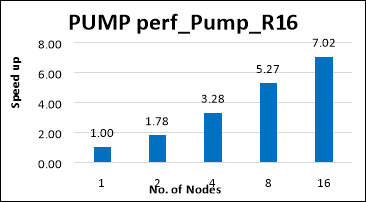
PUMP perf_Pump_R16 |
10 |
1 |
64 |
16.19 |
1.00 |
|
2 |
128 |
9.09 |
1.78 |
||
|
4 |
256 |
4.93 |
3.28 |
||
|
8 |
512 |
3.07 |
5.27 |
||
|
16 |
1024 |
2.30 |
7.02 |
- Airfoil with 10M mesh size
|
Job Name |
Iterations |
No. of Nodes |
No. of Cores |
CFD solver wall clock Time (s) |
Speed Up |
|
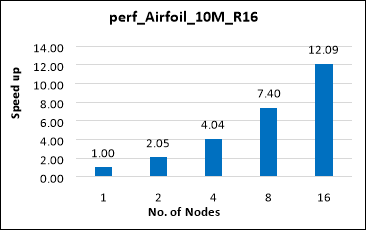
perf_Airfoil_10M_R16 |
10 |
1 |
64 |
113.87 |
1.00 |
|
2 |
128 |
55.43 |
2.05 |
||
|
4 |
256 |
28.21 |
4.04 |
||
|
8 |
512 |
15.39 |
7.40 |
||
|
16 |
1024 |
9.42 |
12.09 |
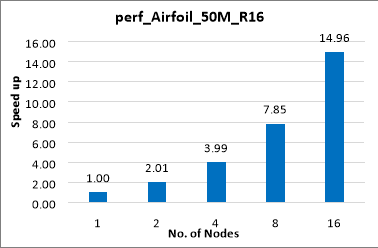
- Airfoil with 50M mesh size
|
Job Name |
Iterations |
No. of Nodes |
No. of cores |
CFD solver wall clock Time (s) |
Speed Up |
|
perf_Airfoil_50M_R16 |
10 |
1 |
64 |
573.76 |
1.00 |
|
2 |
128 |
284.75 |
2.01 |
||
|
4 |
256 |
143.73 |
3.99 |
||
|
8 |
512 |
73.09 |
7.85 |
||
|
16 |
1024 |
38.35 |
14.96 |
- Airfoil with 100M mesh size
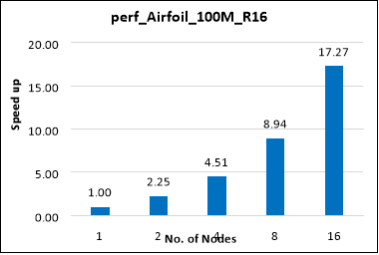
|
Job Name |
Iteration |
# Of Nodes |
# Of Cores |
CFD solver wall clock Time (s) |
Speed up |
|
perf_Airfoil_100M_R16 |
10 |
1 |
64 |
1445.70 |
1.00 |
|
2 |
128 |
642.95 |
2.25 |
||
|
4 |
256 |
320.27 |
4.51 |
||
|
8 |
512 |
161.64 |
8.94 |
||
|
16 |
1024 |
83.73 |
17.27 |
3 Azure Cost
In the below cost reports presented, we have shown only the indicative costs. The application installation time is not considered and only the wall clock time per 100 iterations for running each model in Ansys CFX on HBv3 virtual machine is considered and the license cost is not included.
The Hourly rates reported are subject to change. For the current rate please refer the link below “https://azure.microsoft.com/en-in/pricing/calculator/”
Note: Licensing cost is not included in this cost calculation sheet of Ansys CFX Application.
- Cost calculation for single Node configuration
|
VM Name |
# CPUs |
Azure VM hourly cost ($) |
CFD Solver Wall clock time (Hours) |
Azure consumption |
|
Standard_HB120-16rs_v3 |
16 |
$ 4.68 |
0.85 |
$ 3.99 |
|
Standard_HB120-32rs_v3 |
32 |
$ 4.68 |
0.64 |
$ 2.99 |
|
Standard_HB120-64rs_v3 |
64 |
$ 4.68 |
0.60 |
$ 2.79 |
|
Standard_HB120-96rs_v3 |
96 |
$ 4.68 |
0.61 |
$ 2.87 |
|
Standard_HB120rs_v3 |
120 |
$ 4.68 |
0.63 |
$ 2.94 |
- Azure cost calculation for multi-Node configuration
|
VM Name |
# Nodes |
# Cores |
CFD Solver Wall clock time (Secs) |
Hrs |
Azure Cost/Hr |
Azure Cost |
|
HB120rs-64rs_v3 |
1 |
64 |
2175 |
0.60 |
$ 4.68 |
$ 2.79 |
|
2 |
128 |
1005 |
0.28 |
$ 4.68 |
$ 2.58 |
|
|
4 |
256 |
504 |
0.14 |
$ 4.68 |
$ 2.59 |
|
|
8 |
512 |
257 |
0.07 |
$ 4.68 |
$ 2.63 |
|
|
16 |
1024 |
134 |
0.04 |
$ 4.68 |
$ 2.78 |
4 Summary
- Ansys CFX Application is successfully deployed and tested on HBv3 120 AMD EPYC™ 7003-series (Milan) CPU cores Azure Virtual Machines.
- Ansys CFX simulations on single node configuration scaling well up to 64 cores and after that the speedup is saturating with further increase in the cores.
- For Multi-Node runs, Ansys CFX is scaling up linearly with increase of nodes as seen in above results
- Azure provides the suitable Virtual Machines equipped with latest CPUs for running CFX/CFD Simulations.
5 Running Ansys CFX on Azure Virtual Machines:
Users can use Ansys Cloud or alternatively they can reach out to any one of the following contact for the further support.
- Contact through Ansys: cloud-sales@ansys.com
- Contact through Microsoft: Microsoft global black belt team
- Contact through Capgemini: AzureHPC-Certification@capgemini.com