

Azure HPC Recipe Document for Ansys Dyna
1 Introduction
Running a complex FEA simulation requires significant amount of time and the latest hardware with faster computational (CPU and GPU) capabilities. Microsoft Azure provides all the necessary infrastructure required to run these high-end work loads and jobs. The Microsoft Azure Virtual Machines are equipped with latest CPUs and GPUs in the market. One such Azure Virtual Machine Configuration is HB120rs_v3 Virtual Machine.
The HBv3 virtual machine (Standard_HB120rs_v3 Virtual Machine) feature up to 120 AMD EPYC 7003-series (Milan) CPU cores, 448 GB of RAM.
|
Size |
vCPU |
Memory: GiB |
Memory bandwidth GB/s |
Base CPU frequency (GHz) |
All-cores frequency (GHz, peak) |
Single-core frequency (GHz, peak) |
RDMA performance (Gb/s) |
Max data disks |
|
Standard_HB64rs_v3 |
64 |
448 |
350 |
2.45 |
3.1 |
3.675 |
200 |
32 |
Ansys LS-Dyna is tested on HB120rs_v3 VM and the performance results are analyzed to find out the optimal configuration.
The subsequent section will show the performance of Ansys LS-Dyna on Azure HBv3 Virtual Machine.
2 Ansys LS-Dyna 2022 R1 Performance on Azure Virtual Machines
2.1 Ansys LS-Dyna 2022 R1 Overview
Ansys LS-Dyna is general purpose, implicit and explicit FEM software used for most advanced non-linear structural simulation, which enables users to solve complex crash and forming simulations and make better, faster design decisions. It’s fully automated contact analysis capabilities and error checking features enables users to solve many complex crash and forming simulations. LS-Dyna’s potential applications are numerous and can be tailored to many fields. LS-dyna is not limited to any particular type of simulation. In a given simulation any of the LS-Dyna’s features can be combined to model a wide variety of physical events. LS-Dyna is used by the automotive industry to analyse vehicle designs. LS-dyna accurately predicts a car’s behaviour in a collision and effects of collision upon car’s occupants. With LS-Dyna automotive companies and their suppliers can test car designs without having to tool or experimentally test a prototype, thus saving time and expense.
2.2 Models
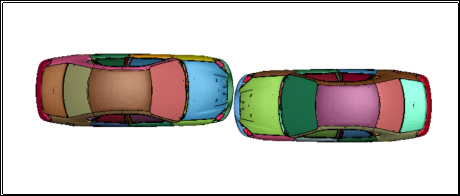
1) Car2car_4ms

2.3 Ansys LS-Dyna 2022 R1 Performance Results
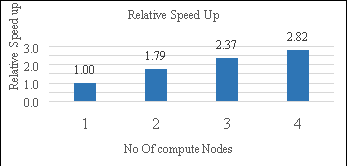
Performance tests have been performed on the provided models, and the elapsed run time and speed up have been determined and presented below.
|
LS-Dyna: 2022 R1 & mpp 12.1 (Each Node with 64 cores) |
||
|
No Of compute Nodes |
Elapsed time in sec |
Relative speed up |
|
1 |
7296 |
1.00 |
|
2 |
4086 |
1.79 |
|
3 |
3081 |
2.37 |
|
4 |
2587 |
2.82 |
3 Azure Cost
For the below cost reports, the application installation time is not considered and only the time taken to run all provided models in Ansys LS-Dyna on HBv3 virtual machine is considered and license cost is not included.
The Hourly rates reported are subject to change. For the current rate please refer the link “https://azure.microsoft.com/en-in/pricing/calculator/”
1) Car2car_4ms
|
VM Name : HB120rs-64rs_v3 ( 64 cores / node ) |
||||
|
No Of nodes |
# CPUs |
Azure VM hourly cost ($) / Node |
Wall clock time (Hours) |
Azure consumption |
|
1 |
64 |
$4.68 |
2.03 |
$9.48 |
|
2 |
128 |
$4.68 |
1.14 |
$10.62 |
|
3 |
192 |
$4.68 |
0.86 |
$12.02 |
|
4 |
256 |
$4.68 |
0.72 |
$13.45 |
4 Summary
- Ansys LS-Dyna Application is successfully deployed and tested on HB120rs_v3 series Azure Virtual Machines.
- Ansys LS-Dyna simulations on Azure VM configuration scaling well up to 64 cores and after that the speedup is saturating with further increase in the cores.
- Ansys LS-Dyna simulations on single node configuration are scaling well up to 64 CPUs and after that the speedup is saturating with further increase in the no of cores. Hence for cluster runs 64 cores / node configuration is chosen.
5 Running Ansys LS-Dyna 2022 R1 on Azure Virtual Machines:
Users can use Ansys Cloud or alternatively they can reach out to any one of the following contact for the further support.
- Contact through Ansys: cloud-sales@ansys.com
- Contact through Microsoft: Microsoft global black belt team
- Contact through Capgemini: AzureHPC-Certification@capgemini.com