

Azure HPC Recipe Document for Ansys Fluent
1 Introduction
Running a complex CFD simulation requires significant amount of time and the latest hardware with faster computational (CPU and GPU) capabilities. Microsoft Azure provides all the necessary infrastructure required to run these high-end work loads and jobs. The Microsoft Azure Virtual Machines are equipped with latest CPUs and GPUs in the market. One such Azure Virtual Machine Configuration is HB120rs_v3 Virtual Machine.
The HBv3 virtual machine (Standard_HB120rs_v3 Virtual Machine) feature up to 120 AMD EPYC 7003-series (Milan) CPU cores, 448 GB of RAM.
|
Size |
vCPU |
Memory: GiB |
Memory bandwidth GB/s |
Base CPU frequency (GHz) |
All-cores frequency (GHz, peak) |
Single-core frequency (GHz, peak) |
RDMA performance (Gb/s) |
Max data disks |
|
Standard_HB120rs_v3 |
120 |
448 |
350 |
2.45 |
3.1 |
3.675 |
200 |
32 |
|
Standard_HB96rs_v3 |
96 |
448 |
350 |
2.45 |
3.1 |
3.675 |
200 |
32 |
|
Standard_HB64rs_v3 |
64 |
448 |
350 |
2.45 |
3.1 |
3.675 |
200 |
32 |
|
Standard_HB32rs_v3 |
32 |
448 |
350 |
2.45 |
3.1 |
3.675 |
200 |
32 |
|
Standard_HB16rs_v3 |
16 |
448 |
350 |
2.45 |
3.1 |
3.675 |
200 |
32 |
HBv3 VM’s with different number of vCPU’s are deployed to find out the optimal configuration for Ansys Fluent 2021 R2 on single node. Based on the single node performance, the VM configuration for multimode runs has been selected.
The subsequent section will show the performance of Ansys Fluent 2021 R2 on Azure HBv3 Virtual Machines on single node and multi-node cluster configurations
2 Ansys Fluent 2021 R2 Performance on Azure Virtual Machines
2.1 Ansys Fluent Overview
Ansys Fluent enables users to solve complex CFD engineering problems and make better, faster design decisions. Ansys Fluent gives you more time to innovate and optimize product performance. With Ansys Fluent, you can create advanced physics models and analyse a variety of fluids phenomena—all in a customizable and intuitive space.
2.2 Ansys Fluent 2021 R2 Performance Results on Single Node
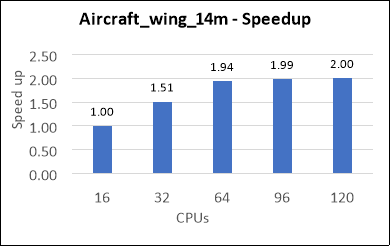
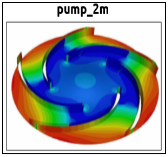
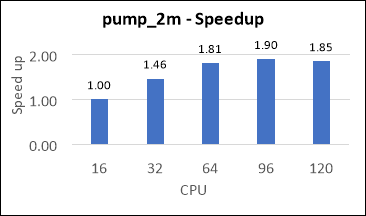
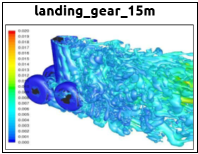
Performance tests have been performed on the below Test models, and the Total Wall-clock time per 100 iterations (in seconds) and speed up have been determined and presented below.
1) Aircraft_wing_14m


|
Job Name |
Cores |
Wall-Time per 100 iters (s) |
Speedup |
|
Aircraft wing 14m |
16 |
860.67 |
1.00 |
|
32 |
569.03 |
1.51 |
|
|
64 |
442.69 |
1.94 |
|
|
96 |
433.45 |
1.99 |
|
|
120 |
429.54 |
2.00 |
2) Pump_2m

|
Job Name |
Cores |
Wall- Time per 100 iters (s) |
Speedup |
|
pump 2m |
16 |
213.83 |
1.00 |
|
32 |
146.38 |
1.46 |
|
|
64 |
118.26 |
1.81 |
|
|
96 |
112.53 |
1.90 |
|
|
120 |
115.47 |
1.85 |
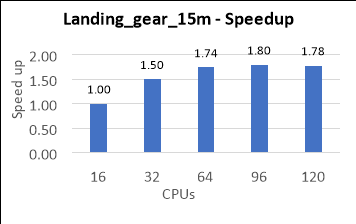
3) Landing_gear_15m

|
Job Name |
Cores |
Wall-time per 100 iters (sec) |
Speedup |
|
Landing gear_15m |
16 |
871.37 |
1.00 |
|
32 |
580.31 |
1.50 |
|
|
64 |
501.02 |
1.74 |
|
|
96 |
484.46 |
1.80 |
|
|
120 |
489.96 |
1.78 |
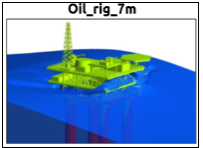
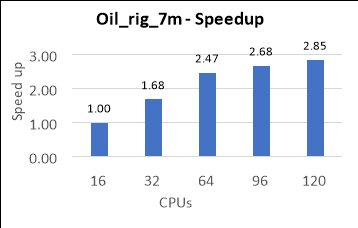
4) Oil_Rig_7m

|
Job Name |
Cores |
Wall-time per 100 iters (s) |
Speedup |
|
Oil rig 7m |
16 |
377.11 |
1.00 |
|
32 |
224.16 |
1.68 |
|
|
64 |
152.42 |
2.47 |
|
|
96 |
140.81 |
2.68 |
|
|
120 |
132.34 |
2.85 |
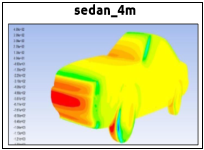
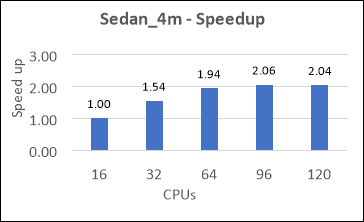
5) Sedan_4m

|
Job Name |
Cores |
Wall-time per 100 iters (s) |
Speedup |
|
sedan 4m |
16 |
154.02 |
1.00 |
|
32 |
99.88 |
1.54 |
|
|
64 |
79.40 |
1.94 |
|
|
96 |
74.88 |
2.06 |
|
|
120 |
75.62 |
2.04 |
6) Combustor_12m

|
Job Name |
Cores |
Wall-Time per 100 iters (s) |
Speedup |
|
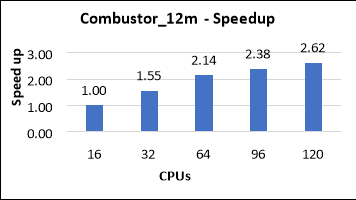
combustor 12m |
16 |
3238 |
1.00 |
|
32 |
2085 |
1.55 |
|
|
64 |
1513 |
2.14 |
|
|
96 |
1360 |
2.38 |
|
|
120 |
1236 |
2.62 |
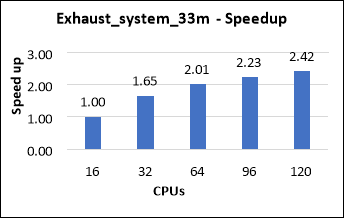
7) Exhaust_System_33m

|
Job Name |
Cores |
Wall-Time per 100 iters (s) |
Speedup |
|
Exhaust system 33m |
16 |
2685 |
1.00 |
|
32 |
1628 |
1.65 |
|
|
64 |
1334 |
2.01 |
|
|
96 |
1205 |
2.23 |
|
|
120 |
1112 |
2.42 |
2.3 Ansys Fluent 2021 R2 Performance Results on Multi-Nodes (Cluster)
From the Performance of Ansys Fluent on single node Virtual machines, we could observe that Ansys Fluent gives the optimal performance with 64 cores and 96 cores VM configurations of HBv3 Series. Here we observed that the scaleup difference between 64 CPUs and 96 CPUs is 5% to 10%. If we take the license cost into consideration, 64 CPUs Configuration will be an optimal choice for the end user in terms of both performance and cost. So, we considered Standard_HB120-64rs_v3 with 64 cores configuration for Multi-node Simulations and carried out the Benchmarking on HBv3 Cluster setup
Below are the Performance results of the fluent models
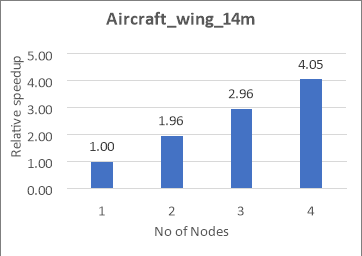
1) Aircraft_wing_14m
|
Nodes |
Cores |
wall- time per 100 iters (s) |
Speedup |
|
1 |
64 |
442.69 |
1.00 |
|
2 |
128 |
226.06 |
1.96 |
|
3 |
192 |
149.31 |
2.96 |
|
4 |
256 |
109.23 |
4.05 |
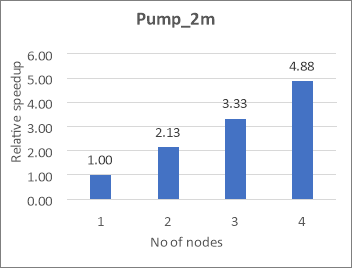
2) Pump_2m
|
Node |
cores |
Wall-time per 100 iters (s) |
Speedup |
|
1 |
64 |
118.26 |
1.00 |
|
2 |
128 |
55.42 |
2.13 |
|
3 |
192 |
35.53 |
3.33 |
|
4 |
256 |
24.26 |
4.88 |
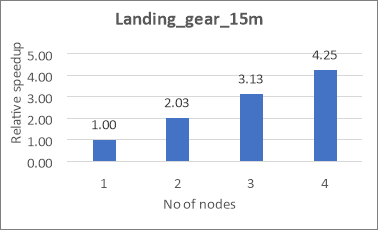
3) Landing_gear_15m
|
Nodes |
Cores |
Wall-time per 100 iters (s) |
Speedup |
|
1 |
64 |
501.02 |
1.00 |
|
2 |
128 |
247.17 |
2.03 |
|
3 |
192 |
160.02 |
3.13 |
|
4 |
256 |
117.78 |
4.25 |
4) Oil_Rig_7m
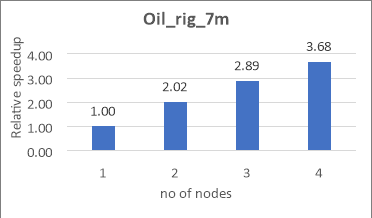
|
Node |
Cores |
Wall-time per 100 iters (s) |
Speedup |
|
1 |
64 |
152.42 |
1.00 |
|
2 |
128 |
75.48 |
2.02 |
|
3 |
192 |
52.76 |
2.89 |
|
4 |
256 |
41.38 |
3.68 |
5) Sedan_4m
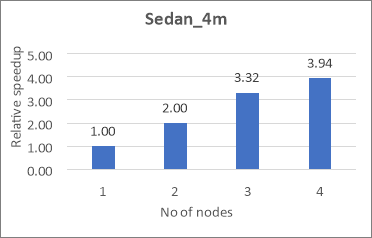
|
Node |
Cores |
Wall-time per 100 iters (s) |
Speedup |
|
1 |
64 |
79.40 |
1.00 |
|
2 |
128 |
39.66 |
2.00 |
|
3 |
192 |
23.90 |
3.32 |
|
4 |
256 |
20.15 |
3.94 |
6) Combustor_12m
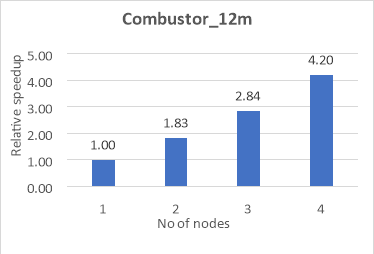
|
Node |
Cores |
Wall-time per 100 iters (s) |
Speedup |
|
1 |
64 |
1512.56 |
1.00 |
|
2 |
128 |
828.63 |
1.83 |
|
3 |
192 |
531.82 |
2.84 |
|
4 |
256 |
359.86 |
4.20 |
7) Exhaust_System_33m
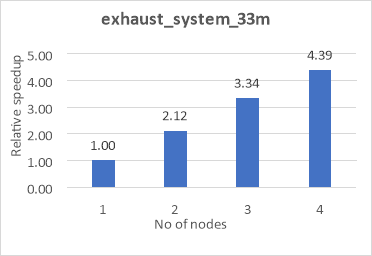
|
Nodes |
Cores |
Wall-time per 100 iters (s) |
Speedup |
|
1 |
64 |
1333.72 |
1.00 |
|
2 |
128 |
629.02 |
2.12 |
|
3 |
192 |
399.66 |
3.34 |
|
4 |
256 |
304.05 |
4.39 |
3 Azure Cost
In the below cost reports presented, we have shown only the indicative costs. The application installation time is not considered and only the wall clock time per 100 iterations for running each model in Ansys Fluent on HBv3 virtual machine is considered and the license cost is not included.
The Hourly rates reported are subject to change. For the current rate please refer the link below “https://azure.microsoft.com/en-in/pricing/calculator/”
Cost calculation for single Node configuration
|
VM Name |
# CPUs |
Azure VM hourly cost ($) |
Wall clock time (Hours) |
Azure consumption |
|
HB120rs-16rs_v3 |
16 |
$ 4.68 |
2.33 |
$10.92 |
|
HB120rs-32rs_v3 |
32 |
$ 4.68 |
1.48 |
$6.93 |
|
HB120rs-64rs_v3 |
64 |
$ 4.68 |
1.15 |
$5.38 |
|
HB120rs-96rs_v3 |
96 |
$ 4.68 |
1.06 |
$4.95 |
|
HB120rs_v3 |
120 |
$ 4.68 |
1.00 |
$4.67 |
Azure cost calculation for multi-Node configuration
|
VM Name |
# Nodes |
# Cores |
Azure VM hourly cost ($) |
Wall clock time (Hours) |
Azure consumption |
|
HB120rs-64rs_v3 |
1 |
64 |
$ 4.68x1 |
1.15 |
$5.38 |
|
HB120rs-64rs_v3 |
2 |
128 |
$ 4.68x2 |
0.58 |
$5.46 |
|
HB120rs-64rs_v3 |
3 |
192 |
$ 4.68x3 |
0.38 |
$5.28 |
|
HB120rs-64rs_v3 |
4 |
256 |
$ 4.68x4 |
0.27 |
$5.08 |
4 Summary
- Ansys Fluent 2021 R2 Application is successfully deployed and tested on HBv3 AMD EPYC 7003 series Azure Virtual Machines.
- Ansys Fluent simulations on single node configuration are scaling well up to 64 CPUs and 96 CPUs and after that the speedup is saturating with further increase in the cores.
- For Multi-Node runs, Ansys Fluent is scaling up linearly with increase of nodes as seen in above results
5 Running Ansys Fluent on Azure Virtual Machines:
Users can use Ansys Cloud or alternatively they can reach out to any one of the following contact for the further support.
- Contact through Ansys: cloud-sales@ansys.com
- Contact through Microsoft: Microsoft global black belt team
- Contact through Capgemini: AzureHPC-Certification@capgemini.com