

Azure HPC Recipe Document for Ansys Rocky
1 Introduction
Running a complex Discrete Element Modelling (DEM) Particle Simulation requires significant amount of time and the latest hardware with faster compute (CPU and GPU) capabilities. Microsoft Azure provides all the necessary infrastructure required to run these high-end work loads and jobs. The Microsoft Azure Virtual Machines are equipped with latest CPUs and GPUs in the market. One such Azure Virtual Machine Configuration is ND A100 v4-series Virtual Machine.
The ND A100 virtual machine is a new flagship addition to the Azure GPU family. This VM is powered by NVIDIA Ampere A100 Tensor Core GPUs and 96 physical 2nd-generation AMD EPYC™ CPU cores (2.44GHz). The “ND96asr_v4” VM has 8 GPUs with 40 GB of memory each and supported by 96 AMD processor cores with a total memory of 900GB. Each GPU features NVLINK 3.0 connectivity for communication within the VM. Ansys-Rocky is tested on ND A100 VM and the performance results are shown in the subsequent sections of the document
|
VM Name |
vCPU |
Memory (GiB) |
SSD (GiB) |
GPU |
GPU Memory (GiB) |
Max Data Disk |
Max uncached disk throughput: IOPS / MBps |
Max network bandwidth |
Max NICs |
|
Standard_ND96asr_v4 |
96 |
900 |
6000 |
8 A100 |
40 |
32 |
80,000 / 800 |
24,000 Mbps |
8 |
2 Ansys Rocky Performance on Azure Virtual Machine
2.1 Ansys Rocky Overview
Rocky is a powerful 3D Discrete Element Modelling (DEM) Particle Simulation Software that quickly and accurately simulates the flow behaviour of bulk materials with complex particle shapes and size distributions, for typical applications such as conveyor chutes, mills, mixers, and other materials handling equipment.
Rocky is designed to solve engineering problems. Rocky is uniquely capable to models real particle shapes including any solids, 2D shells, and rigid and flexible fibres. The simulations are fast and accurate. With multi-graphics processing unit (GPU) solver technology, you can simulate the behaviour of different shaped and sized particles in many industrial applications.
Leading companies in the heavy equipment, off-road, mining, steelmaking, agriculture equipment manufacturing and food processing industries use ROCKY to understand and predict granular material behaviours, evaluate equipment performance, and optimize processes.
Product Highlights
Simulate Real-Scale Experiments
Rocky DEM’s high-performance computing (HPC) abilities can simulate a large number of real-sized and real-shaped particles faster and with less memory usage.
Model Realistic Materials
Modify a default shape, scan a real 3D object or custom design your own shape and import it. Then define the behaviour to be rigid or flexible, sticky or dry, breakable and more.
Solve Unique Problems
Rocky DEM’s representation of application-specific particle shapes is becoming essential to the successful engineering of bulk materials handling equipment.
2.2 Model Details
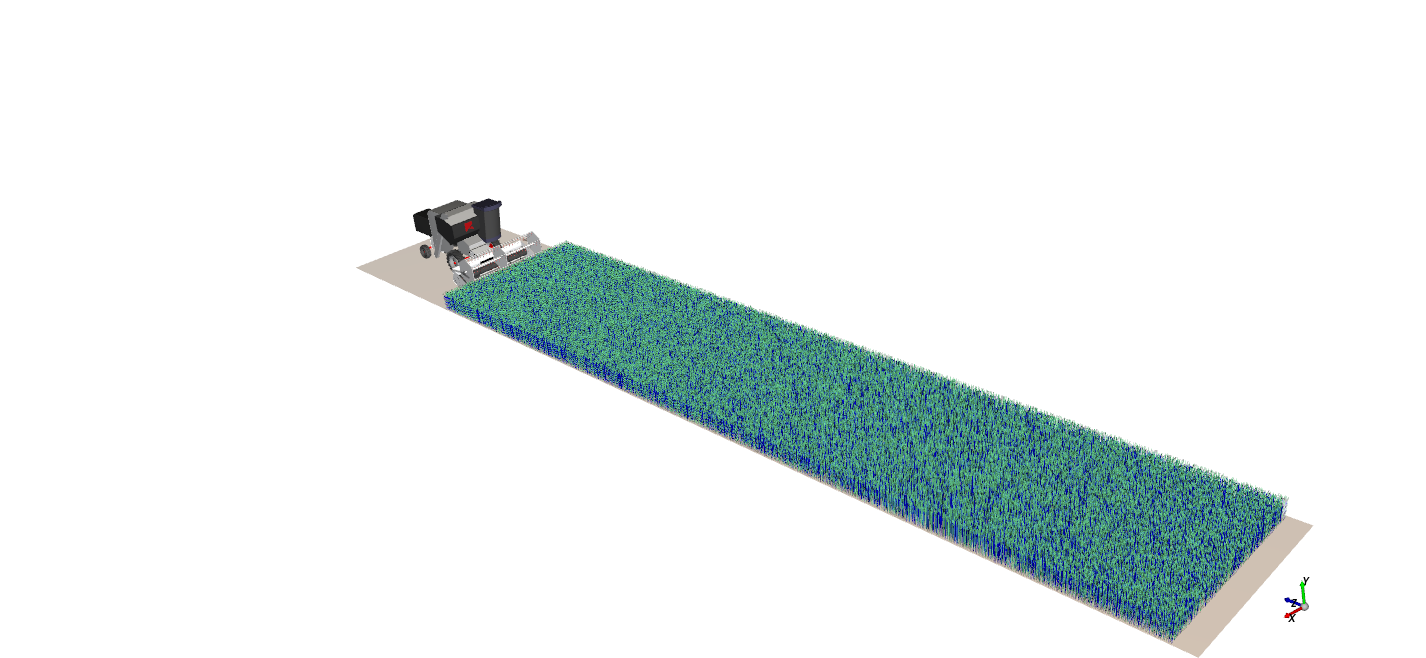
Combine harvester model is considered for testing the performance of the Rocky on Azure VM. The model is shown below,

2.3 Ansys Rocky_2021.R2.1 Performance Results
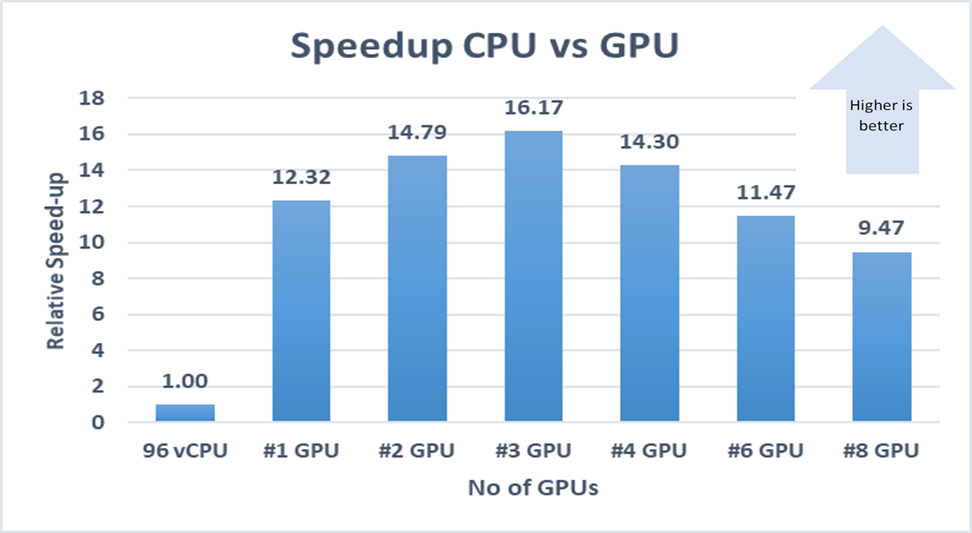
GPU and CPU based Discrete Element Modelling (DEM) Particle Simulation is carried out on the VM and the results are presented below,

3 Azure Cost
For the below cost reports, the application installation time and pre-processing is not considered and only wall clock time is considered for the cost calculation. The Hourly rates reported are subject to change. For the current rate, please refer the link https://azure.microsoft.com/en-in/pricing/calculator/.
|
VM Name |
# GPUs |
Azure VM hourly cost ($) |
Wall clock time (Hours) |
Azure cost |
|
ND96asr_v4 |
0 (#96 CPU) |
$39.77 |
10.97 |
$436.16 |
|
ND96asr_v4 |
1 |
$39.77 |
0.89 |
$35.40 |
|
ND96asr_v4 |
2 |
$39.77 |
0.74 |
$29.50 |
|
ND96asr_v4 |
3 |
$39.77 |
0.68 |
$26.98 |
|
ND96asr_v4 |
4 |
$39.78 |
0.77 |
$30.50 |
|
ND96asr_v4 |
6 |
$39.77 |
0.96 |
$38.03 |
|
ND96asr_v4 |
8 |
$39.77 |
1.16 |
$46.04 |
Note: The wall clock time for a full production-level test case of combine harvester model will be on the higher side than the results presented here and the associated cost will increase.
4 Summary
- Ansys-Rocky Application is successfully deployed and tested on ND96asr_v4 series Azure Virtual Machine
- The expected speed up is achieved when compared between CPU and one GPU.
- For all models, there is an optimal amount of computational hardware that achieves best price/performance, after which adding additional hardware does not scale the performance substantially. For this particular harvester model, we see the peak optimal performance achieved when we utilized 3 GPUs. For larger or more complex models, we expect this optimal GPU number to be higher, and for smaller ones we expect it to be lower.
5 Running Ansys Rocky on Azure Virtual Machines:
Users can use any one of the following three options to deploy Ansys-Rocky on Azure
- Contact through Ansys: https://www.ansys.com/en-in/contact-us
- Contact through Microsoft: Microsoft global black belt team
- Contact through Capgemini: AzureHPC-Certification@capgemini.com